


Compass - Digital Compass 2026
4.525.00 Reviews
App Specs
- Version
- 1.3.2
- Updated On
- License
- Free
- Downloads
- 500,000+
- Developer
- Firehawk
- Categories
- Maps & Navigation
- Platform
- Android
Screenshots
 Analysis by AppCompare
I spent time using Compass - Digital Compass 2026 as a straightforward navigation companion, and its appeal became clear almost immediately: it focuses on showing direction without trying to become a full mapping platform. This is a free Android app in the Maps & Navigation category, developed by Firehawk, and it is aimed at people who want a readable compass with a clean presentation rather than a complicated collection of travel tools.
That narrow purpose is important. A digital compass is useful when I need to orient myself quickly, check which way I am facing, or combine a direction reading with basic outdoor information. It is not a replacement for turn-by-turn navigation, offline trail mapping, or a dedicated hiking computer. If I keep that distinction in mind, the app makes much more sense and is easier to judge fairly.
How the compass feels in everyday use
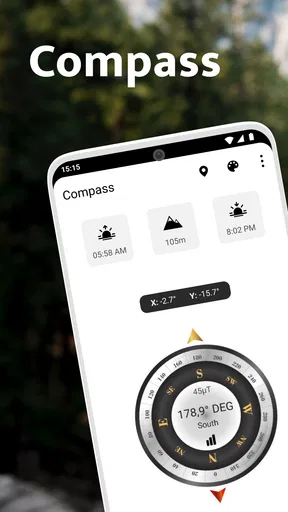
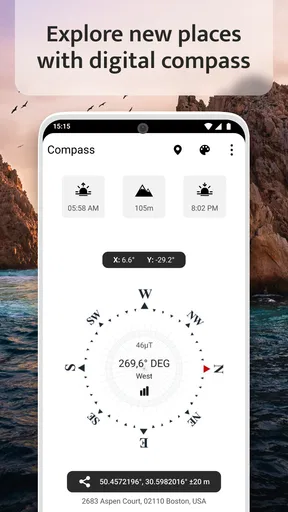
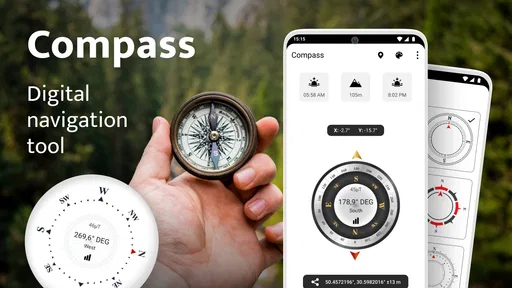
The main experience is deliberately simple. I open the app, look at the compass display, and use the direction in front of me instead of working through menus. The design is one of its strongest qualities because a compass loses much of its usefulness when the screen is crowded with controls, advertisements, or unrelated panels. Here, the emphasis stays on the reading itself.
I found that simplicity especially helpful in situations where I only needed a quick answer. For example, if I am standing outside a new building and want to know which direction leads back toward a road, I do not need a route planner. I need to hold the phone steadily, wait for the display to settle, and read the heading. The app suits that kind of short decision well.
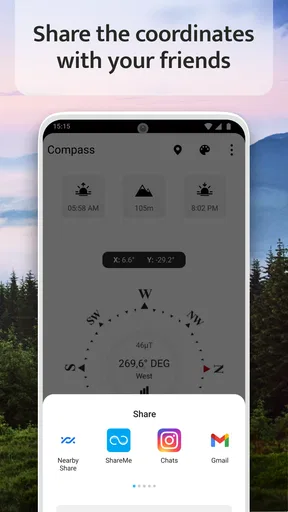
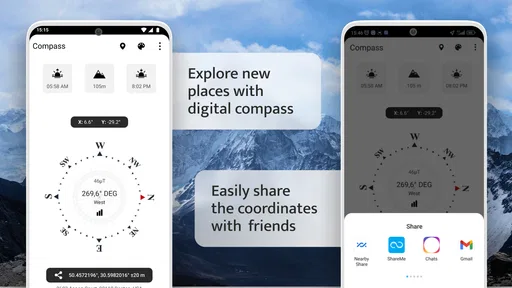
The presentation also includes altitude information, along with sunrise and sunset details. Those additions give the compass more practical context without changing its basic character. When I am preparing for a walk, knowing the approximate direction and the day’s light pattern in one place is more convenient than opening several unrelated tools.
There is a useful distinction between these supporting details and a proper outdoor navigation system. Altitude and sun information can help me plan when to leave or decide whether a route may become uncomfortable after dark, but they do not tell me where a trail goes. I still need a map or route source for that. The app works best as a compact orientation instrument, not as a complete trip planner.
What the free experience actually offers
The app is free to install, which makes trying it low risk. That matters for a tool like this because many people only discover whether they like a compass after holding the phone in real conditions. I can test the display around the house, in a park, or before a trip without paying upfront simply to see whether the interface suits me.
Worth Reading Before You Choose

EA SPORTS FC Mobile 26 Is a Bigger Football Game, but It Takes Time

Flipboard Shows What News Apps Must Do Beyond the Feed

Switching to Android Auto Means Rethinking Your Driving Routine

Google Calendar Makes a Crowded Week Easier to Manage

Ludo King Makes the Most of the Minutes Between Plans

Baby Panda World Brings Quick Play to Modern Phones, but Its Game Library Feels Busy
There are in-app purchases ranging from $0.99 to $99.99 per item. I would therefore treat the free access as the starting point and examine any purchase screen carefully before confirming anything. The existence of a wide purchase range means the free label should not automatically be read as “every possible part of the experience is included at no cost.” The sensible approach is to use the basic compass first and decide whether any optional value is genuinely relevant to my needs.
That is also where the app’s value needs a little discipline. A compass is a focused utility, so I would not pay for extras merely because they are presented alongside a direction display. A purchase would make sense only if it improves something I personally use often, such as convenience or access to a particular part of the experience. If the basic display already answers my questions, the free version may be enough.
The app is marked for Everyone, which fits its uncomplicated purpose. It is also available for devices running Android 5.0 or later, so it can suit people using older phones as well as newer ones. The current version is 1.3.2, and the app has been available since August 28, 2022. Those details do not guarantee identical behavior on every device, but they make the compatibility range easy to understand before installing.
Where it is more useful than a normal map app
Most phones already include a mapping application, but maps and compasses answer different questions. A map is excellent when I need a destination, route, traffic information, or nearby places. It is less immediate when I simply want to know my present orientation. Opening a large map, waiting for location information, and interpreting the blue position marker can feel excessive for a question as basic as “Which way am I facing?”
This app is quicker for that single task. I can use it while standing still, while checking the layout of a campsite, or while matching a paper map to the landscape. That last use is easy to overlook: a paper map gives me a broad view, while the digital compass gives me a live orientation reference. Used together, they can be more practical than switching repeatedly between a route app and the physical map.
It can also be useful inside a large property where a route app is not especially helpful. If I leave a building through one entrance and want to identify the direction of another area, a compass reading gives me a simple reference even when there are no mapped paths. I would still verify landmarks visually, but the directional cue can reduce the guesswork.
Three habits that make the tool more dependable
My first practical tip is to use the compass before I urgently need it. I would open it at home, rotate slowly, and learn how the display responds to movement. That small test helps me notice whether the phone behaves consistently and prevents me from treating an unfamiliar screen as a reliable emergency instrument without preparation.
Second, I would hold the phone away from obvious sources of magnetic interference. A metal table, a vehicle, a speaker, or other magnetic objects can affect a phone’s internal sensors. If the direction appears to jump, I would move to an open spot and gently move the phone through a few slow rotations rather than immediately trusting the first reading.
Third, I would use the compass as a cross-check instead of the only source of safety-critical information. On a casual walk, a rough orientation is usually enough. In unfamiliar terrain, poor visibility, or a situation where becoming lost would be dangerous, I would pair it with a proper map, known landmarks, and an offline backup. A simple compass can support navigation, but it should not carry the whole responsibility for it.
These habits are not decorative advice; they affect the app’s real value. The display may be clear, but a phone sensor still depends on how the device is held and where it is used. Someone who understands that will get more from the app than someone expecting a perfectly stable instrument under every condition.
Tradeoffs, limitations, and the right kind of user
The biggest limitation is the app’s narrow scope. I would not choose it as my only travel tool if I needed route planning, saved locations, trail details, traffic information, or detailed offline maps. A conventional navigation app is the better choice for reaching an address, and a dedicated hiking application is more suitable for following a marked route or recording an outdoor activity.
The altitude, sunrise, and sunset information adds context, but it does not turn the app into a complete planning system. I can use those details to think about daylight and elevation, yet I still need to make the larger decision myself. That is a strength for users who prefer a clean utility, but a weakness for anyone hoping for guided planning.
Another tradeoff is that a simple interface may feel too bare for experienced outdoor users. Someone who already relies on a specialized navigation setup may see this app as a backup or a quick reference rather than a primary instrument. That is not a flaw in the design so much as a limit of the intended role. The app is most convincing when I ask it to do one job well, not when I ask it to replace an entire collection of tools.
Purchase value also depends heavily on personal use. Since the app can be installed free of charge but includes optional purchases from $0.99 to $99.99 per item, I would avoid assuming that paying is necessary or automatically worthwhile. For a person who only wants a basic direction display, the free entry point is the main attraction. For a frequent user, an optional purchase might be worth considering, but only after checking exactly what it changes and whether that change solves a real problem.
I would recommend it to casual travelers, students learning to use a compass, people who want a clean orientation tool, and anyone who likes having sunrise, sunset, and altitude information close to the directional display. It is also a reasonable secondary tool for a daypack, provided I remember that a phone battery and phone sensors are not the same as a dedicated compass.
I would skip it if my priority is turn-by-turn guidance, detailed route recording, extensive map layers, or a specialized wilderness workflow. In those cases, a full navigation app or dedicated outdoor device will deliver more relevant value, even if the interface is less minimal. I would also skip paying for optional items until I had used the free experience long enough to identify a specific benefit I actually need.
The app has built a solid audience, with an average rating of 4.5 from around 4.1 thousand ratings and more than 500 thousand installs. Those figures suggest that the focused approach works for many people, while the small number of written reviews means I would rely more on my own testing than on short comments alone. The developer, Firehawk, has kept the product’s identity centered on a readable compass rather than stretching it into an overloaded navigation suite.
My final view is positive, with a clear condition: I recommend it when the goal is quick orientation and basic outdoor context. The free installation makes it easy to try, the design is approachable, and the added altitude and daylight information gives the compass more everyday usefulness than a bare directional needle. I would not confuse it with a map service, and I would not spend on optional items without a concrete reason.
For me, the best way to use it is as a lightweight first reference: open it, let the reading settle, compare it with visible landmarks or a map, and then put the phone away. If that matches what you need, Compass - Digital Compass 2026 offers good practical value without demanding much learning. If you need complete navigation, skip it in favor of a tool built around routes and maps rather than direction alone.
Pros
- Quickly shows heading and cardinal directions.
- Useful for hiking
- travel
- and basic outdoor navigation.
- Simple interface is easy for beginners to understand.
- Works well for checking orientation without a physical compass.
- Small app size should have limited impact on device storage.
Cons
- Accuracy depends on your phone’s magnetometer and calibration.
- Nearby metal objects or electronics can affect the readings.
- May require location or sensor permissions on some devices.
- Not a replacement for professional navigation equipment.
- Some features or a cleaner experience may require ads or purchases.
FAQs for Compass - Digital Compass 2026
What is Compass - Digital Compass 2026 used for?
Compass - Digital Compass 2026 is designed to turn your Android or iOS device into a digital magnetic compass. After opening the app, you can use the on-screen direction indicator to identify north, south, east, and west, which can be useful for hiking, travel, outdoor activities, navigation practice, or simply checking your orientation when a traditional compass is not available.
Does Compass - Digital Compass 2026 work without an internet connection?
In most situations, a digital compass can determine direction without mobile data or Wi-Fi because it relies primarily on the phone’s built-in magnetometer and motion sensors. However, some additional features, such as maps, location-based tools, advertisements, or online content, may require connectivity. It is a good idea to open and calibrate the app before leaving an area with reliable internet access.
How accurate is Compass - Digital Compass 2026?
The app’s accuracy depends mainly on the quality and condition of your device’s magnetic and motion sensors. Nearby metal objects, magnets, electronic equipment, car interiors, and magnetic phone cases can interfere with the reading. For better results, move away from possible sources of interference and follow the calibration instructions shown by the app before relying on the displayed direction.
Does Compass - Digital Compass 2026 require location permission?
A basic compass usually does not need location permission to show magnetic direction, although the app may request access if it includes location, map, or navigation-related functions. Before accepting any permission, review the explanation provided by the app and your device’s privacy settings. You can often deny optional access, but certain location-based features may then be unavailable.
Can I rely on Compass - Digital Compass 2026 for professional or emergency navigation?
Compass - Digital Compass 2026 is best treated as a convenient orientation tool rather than a replacement for professional navigation equipment. Phone sensors can be affected by interference, calibration problems, battery limitations, or hardware differences. For hiking in remote areas, marine travel, surveying, or emergencies, carry a reliable physical compass, map, and other appropriate safety equipment instead of depending on the app alone.


